10 free minutes every month · no card required · account in 30 seconds
AI Answer ·autoAnalyze screenFinish12:04
Use cases
One tool, three kinds of calls
Sales calls
The client asks about price, lead time, how you differ from competitors — the answer arrives from your price list and offer before you have time to hesitate. Numbers always exact, objections prepared in advance.
Screening interviews
A client grills you technically before trusting you with a contract? Pairrot answers in first person from your CV and profile, and a task sent to your screen is solved with one shortcut.
Meeting summaries
Every call ends with a transcript and a summary on disk: decisions, deadlines, next steps. You come back to what the client said — not to your own memory.
Works with any call platform
Pairrot takes audio straight from the system, not through a plugin for one specific app. If your Mac can hear the call — Pairrot hears it.
ZoomGoogle MeetMicrosoft TeamsWebex
SlackDiscordFaceTimePhone on speaker
HackerRankCoderPadIn-person meeting
Features
Built for calls where money is on the table
auto-answer
Reacts to questions, not hotkeys
AI Answer ·autoAnalyze Screen12:04
Okay, and how much would that cost for five people?
💬 How much for five people?
For five people the 50-hour pack works best: 1390 zł, which is 278 zł per person. I can have it running today.
from cennik.md · 1.1 s
When the client finishes a question, the answer card appears by itself — no clicking. It waits a beat for them to complete the thought, so it never answers half a sentence.
meeting detection
Notices when a call starts
Pairrot
Sounds like a call just started
Start listening
When another app reaches for the microphone, Pairrot comes forward and offers to start. Listening never turns on by itself — the decision and the meter are yours.
two streams
Knows who is speaking
YOUmic
CLIENTsystem
Your voice comes from the microphone, the client's from system audio — two separate transcription streams. Speaker separation is architecture, not a guess based on voice timbre.
your documents
Answers with your price list
pairrot-context
o-mnie.md2 KB
cv.pdfin prompt184 KB
cennik.md4 KB
oferta.md3 KB
Price list, offer, your CV — plain files, PDF included. The model uses only those and guessing is forbidden: if something is not in there, it suggests "let me check" instead of making things up.
screen analysis
Solves what is on the screen
⌘⇧↩Reading the screen…
Client sent a task, a spreadsheet, some code? One shortcut — Pairrot reads the screen and suggests the solution, along with the words to walk them through it.
after the call
Transcript and takeaways on disk
Ending a call saves the full transcript and a summary to Markdown — date, company and topic in the filename. Get back to what was agreed without replaying an hour of audio.
Agreed: quote by FridayBudget: 40–60kCo-owner joins the demo as decision-makerNext step: demo Aug 19, 10:00
live coding
Task in the editor, solution in the panel
The recruiter pastes a task, you press the shortcut. Pairrot reads the screen and hands back three things at once: an opening line, working commented code, and how to talk through it as you type. The panel floats above the editor — and does not exist in the shared screen.
shared-editor.dev/session/4281You are sharing your screen
…right, and what happens if the component unmounts before the delay elapses?
💬 What if the component unmounts before the delay?
“The timer would fire after unmount and set state on a dead component — that is why useEffect has to return a cleanup.”
Add the return inside the effect:
useEffect(() => {
  const t = setTimeout(() => setDebounced(value), delay)
  return () => clearTimeout(t) // fixes the red test
}, [value, delay])
Screen analysis · 14:32
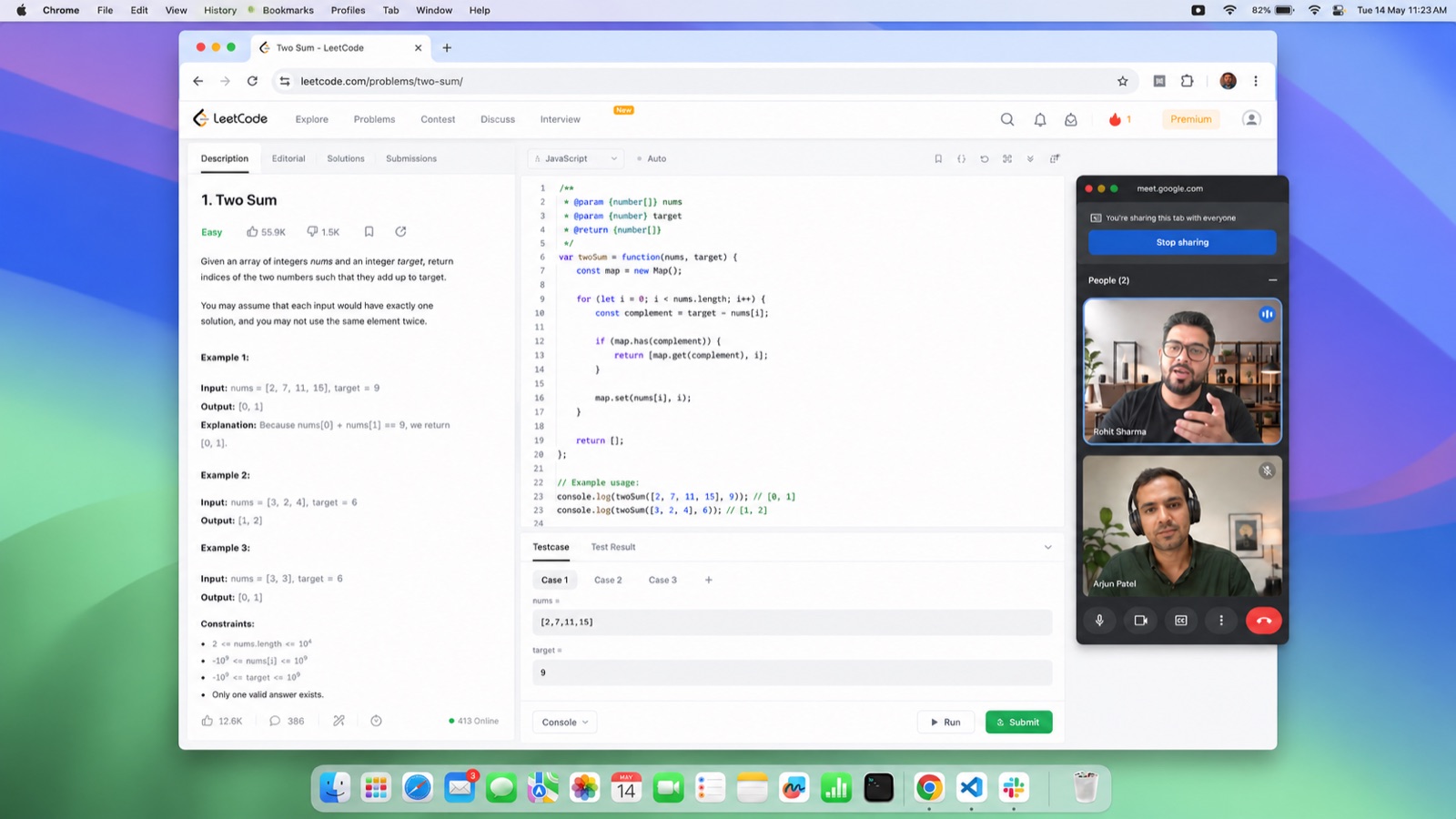
This is what it really looks like: the panel is translucent, so the code shines through — and in the shared screen the panel does not exist. The recruiter sees the bare editor.
Two screens
Same call. Two different screens.
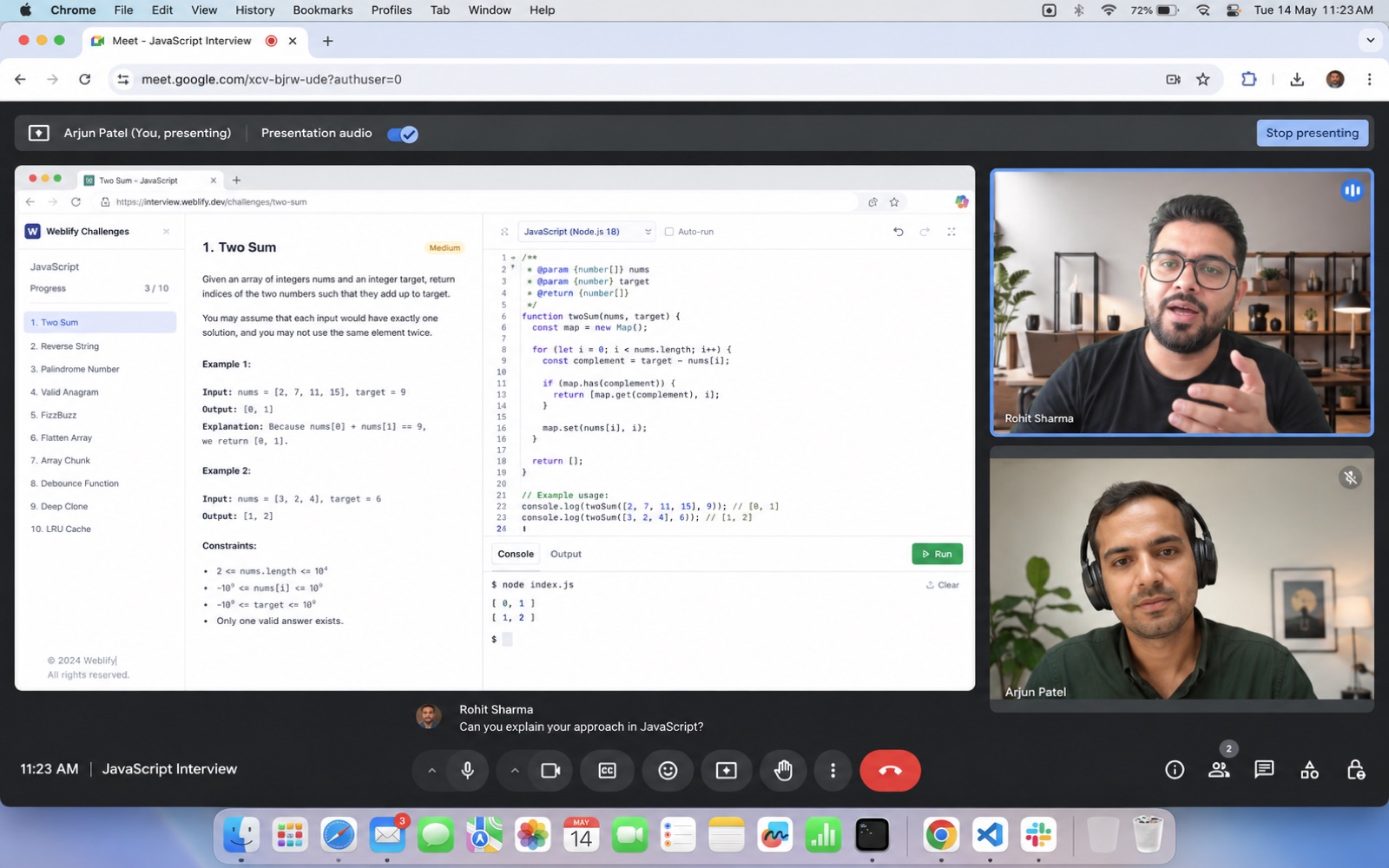
You are sharing your screen the whole time — and yet you see different things. The panel is cut from the video stream at the macOS level.
What the recruiter seesshared screen
A bare editor. The panel does not exist in the video stream — it cannot be spotted, because it never gets there.
What you see
✦ AI AnswerAnalyze screenFinish11:23▲
…okay, and can you walk me through your approach in JavaScript?
💬 Walk me through your Two Sum approach.
"I use a map: for every number I check whether I have already seen its complement. One pass, linear time."
if (map.has(rest)) return [map.get(rest), i]
map.set(nums[i], i)
AI Answer · 11:23
The same editor — plus a panel with the working solution and the words to say.
Invisibility
Private by architecture
Only you can see the panel. Not a promise — a design decision. Verify it on your first screen share.
Invisible on screen share
Cut from the video stream at the macOS level. The client sees only what you share.
No Dock icon, no app switcher entry
Pairrot is absent from every place a caller might accidentally glance at.
Private mode on by default
Nothing to set up before a call — protection is on from the start. Toggle it off and back on with a single shortcut.
⌘⌥P
Collapses to a discreet orb
A coin-sized level indicator stays — everything else waits out of sight.
⌘⌥H
No sounds, no notifications
Nothing beeps and nothing pops up mid-call. Pairrot only listens.
Pricing
Pay for conversations.
Packages never expire and billing is per second. A call that ends after eight minutes uses eight minutes — not an hour.
Every account gets 10 minutes of calls per month — enough to watch the suggestions on your own real conversation. No card required.
Prices include VAT. Card, BLIK or Przelewy24.
FAQ
What everyone asks
Can the client tell I am using Pairrot?+
The panel is excluded from screen capture at the macOS level — during screen sharing it does not exist in the video stream. It makes no sounds and never touches the call itself: it listens to the same audio you hear. The only thing the client can hear is you — so do not read the suggestions word for word.
Does it work with Zoom, Meet, Teams?+
With anything that plays through your speakers or headphones. Pairrot takes audio from the system, not through a plugin for a specific app — so it also works with a phone on speaker or a live meeting in a room.
How does the model know my prices and offer?+
From a folder on your Mac where you drop your price list, offer and common objections — plain text files. The model uses only those and is explicitly forbidden from inventing numbers that are not in them.
Can I upload my CV?+
Yes — drop a PDF or a text file into the same folder as the rest of your documents. In screening calls the model answers in first person from your CV and profile: a real project, your role, the result. And it is strictly forbidden from inventing experience your CV does not contain.
Which Mac do I need?+
Any Mac running macOS 26 — Apple Silicon or Intel. Pairrot does not rely on on-device AI, so it does not need the newest chip.
What about GDPR and call recording?+
Pairrot records nothing — audio is transcribed on the fly and discarded, and the transcript stays only with you. Informing the other party that you use the tool is your responsibility; the privacy policy explains how to do it right.
What if I run out of hours mid-call?+
The call ends at the limit and your balance is always visible in the panel. Topping up takes a minute — card or BLIK — and unused hours never expire.
Your next call could be the best one this quarter
Install and account take three minutes. The first 10 minutes of calls each month are free — test it on a real client.